

The WordPress Plugin Stack We Run on 160+ Australian Websites
Every client asks the same question within about a fortnight of launch: how many plugins should my website have? Can I load some random one I’ve found that will provide my site with a social feed?
It is the wrong question, and I have been giving people the wrong answer for years by trying to answer it honestly. The honest answer sounds evasive — “it depends” — so most agencies replace it with a number. Ten. Fifteen. Under twenty. The number is reassuring and it means nothing. Running a leaner stack means less maintenance and breakages though and so professional web developers like myself will lean towards less rather than more.
Here is what the data actually says. In 2025, 11,334 new vulnerabilities were disclosed across the WordPress ecosystem — up 42% on the year before — and 91% of them were in plugins rather than in WordPress core. The number that should change how you think, though, is this one: the weighted median time between a vulnerability being disclosed and the first real-world attack was five hours. One in five highly exploited flaws was being attacked within six hours. Nearly half within a day.
Five hours is shorter than a business morning. Against a window that tight, a site running twelve plugins that nobody has touched since launch is in far more danger than one running forty that get patched the same day a fix ships.
So we stopped optimising for the plugin count and started optimising for patch velocity. Across the 160-plus websites we look after, that single change in framing decided almost every tool on this list.
We run 49 active plugins on our own site. I am telling you that up front because an article that preaches restraint while quietly doing the opposite is worthless. What matters is that every one of them is on a managed update path, and none of them is there by accident.
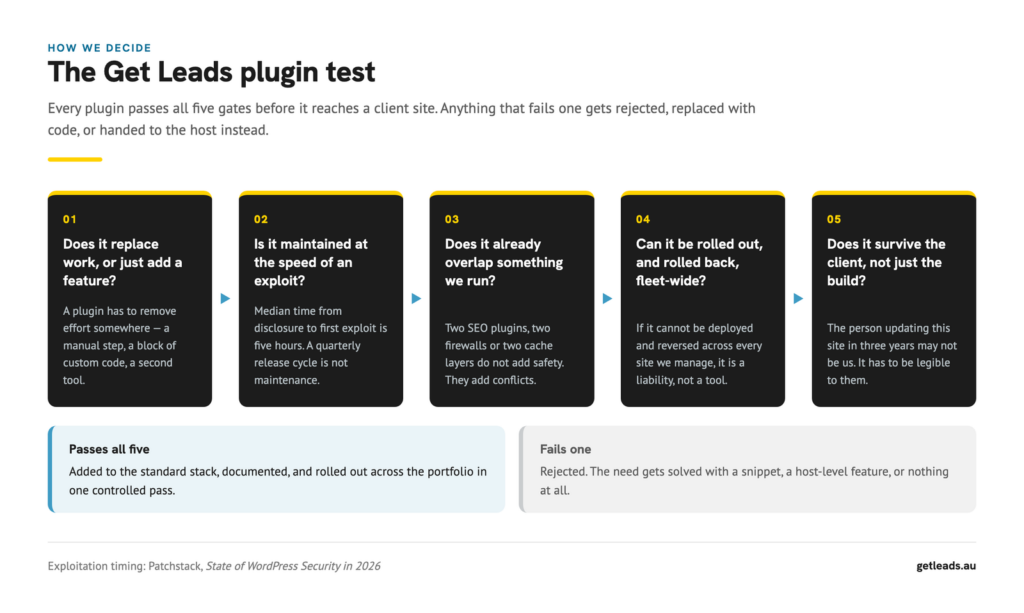
How we decide what earns a place
Five gates. A plugin that fails any one of them does not get installed — the need gets solved with a snippet, handed to the host, or left alone.
- Does it replace work, or just add a feature? A plugin has to remove effort somewhere: a manual step, a block of custom code, a second subscription. “It might be handy” is not a reason.
- Is it maintained at the speed of an exploit? Given a five-hour median, a developer who ships quarterly is not maintaining anything. We look at release cadence and how fast they have historically responded to a disclosure, not at the feature list. We don’t recommend plugins that solve a problem but have no support community.
- Does it overlap something we already run? Two SEO plugins emit duplicate meta tags. Two firewalls fight each other. Two caching layers produce bugs nobody can reproduce. Overlap is not redundancy; it is a fault waiting for a deadline.
- Can it be rolled out — and rolled back — fleet-wide? If we cannot deploy it and reverse it across every site we manage in one controlled pass, it is a liability rather than a tool.
- Does it survive the client, not just the build? The person maintaining this site in three years may not be us. Anything that only we can operate is a trap we have set for someone else.
1. Bricks Builder and Automatic.css — the builder and the design system
Why not Elementor. Elementor is a genuinely capable product with the largest ecosystem in WordPress, and if your team already knows it, that familiarity has real value — I will come back to that. Our objection is structural rather than philosophical: Elementor’s default output nests a lot of wrapper markup, and on content-heavy pages that depth shows up in rendering cost and makes clean semantic structure something you fight for rather than get.
Bricks outputs markup much closer to what we would write by hand, which matters because we are also the ones who have to make these pages rank. Pairing it with Automatic.css gives us one variable-led design system — spacing, type scale, colour — shared across every site, so a change to the system propagates instead of being re-implemented page by page. It is the foundation of how we approach website design and development.
Where Elementor genuinely wins: ecosystem size, the depth of third-party add-ons, and the sheer number of people who can pick up an Elementor site without training. If continuity of maintenance by anyone is your top priority, that is a serious argument and we would not pretend otherwise.
2. ACF Pro and WP Grid Builder — structured content and filtering
A portfolio, a team directory and a location list are not pages. They are records with fields, and the moment you treat them as pages you have signed up to maintain the same layout by hand forever.
ACF Pro defines the fields. WP Grid Builder handles the faceted filtering and search on top of them, and its Bricks integration means the filtered results use the same templates as everything else. JetEngine and JetSmartFilters solve the same problem competently and are a reasonable choice; our preference comes down to ACF’s field API being the one our own tooling already automates against.
3. SEOPress Pro — titles, schema and crawl control
Why not All in One SEO. AIOSEO, Yoast and Rank Math are all solid, and anyone telling you their SEO plugin ranks pages is selling something. Every one of them does the mechanical work well.
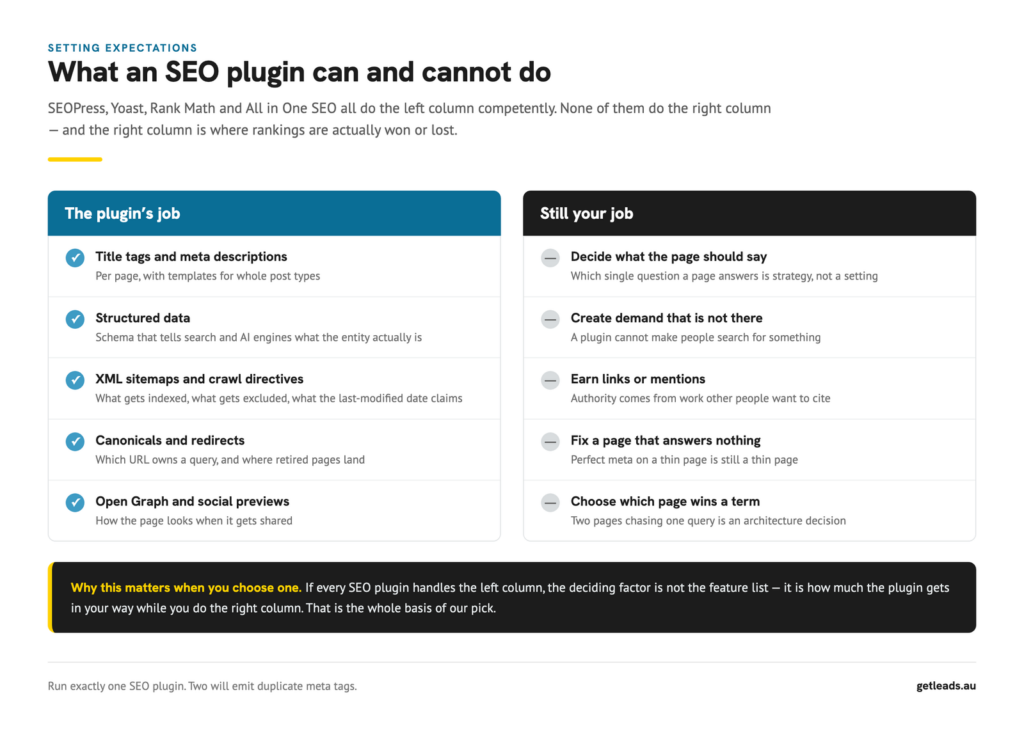
Because the left column is a solved problem, the deciding factor is how much the plugin gets in your way while you do the right column — which is the actual work of search engine optimisation. SEOPress has no upsell interstitials in the editing flow, carries less weight in the admin, and — the reason we actually chose it — exposes a clean PHP and REST surface. Every page’s title, meta and schema on our sites can be read and written programmatically. When we audit 160 websites, that is the difference between a scripted pass and a fortnight of clicking.
One rule regardless of which you pick: run exactly one. Two SEO plugins will emit duplicate meta tags and conflicting canonicals.
4. CrowdSec — security as a network, not a silo
Why not Defender Pro. Defender is a capable per-site suite and it comes bundled with a hosting plan a lot of people already pay for. The limitation is in the model rather than the execution: a per-site firewall learns only from attacks against that site.
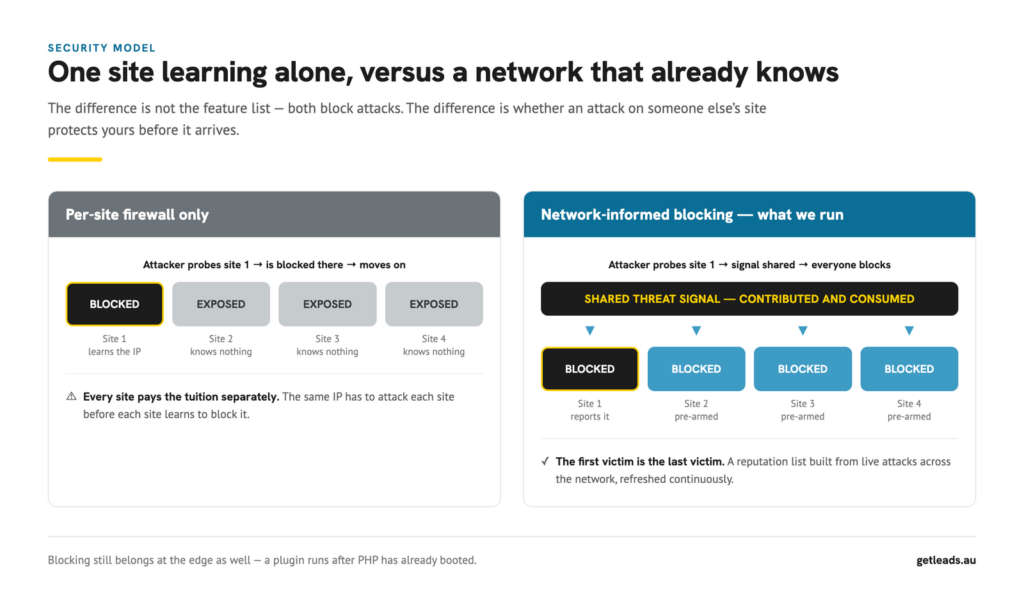
CrowdSec inverts that. Attacks observed anywhere in the network become a shared reputation signal that every participant consumes, so an IP that has just been caught probing a site in Germany is already blocked on a site in Cairns. Across a portfolio our size, that compounds.
Two honest caveats. A plugin-level firewall runs after PHP has booted, so serious blocking belongs at the edge as well — in our case Cloudflare. And one security plugin, never two.
5. FluentSMTP — making sure the enquiry actually arrives
WordPress sends mail through the web server by default. That mail is unauthenticated, frequently fails SPF and DKIM alignment, and gets filtered silently. A lead disappears and nobody knows.
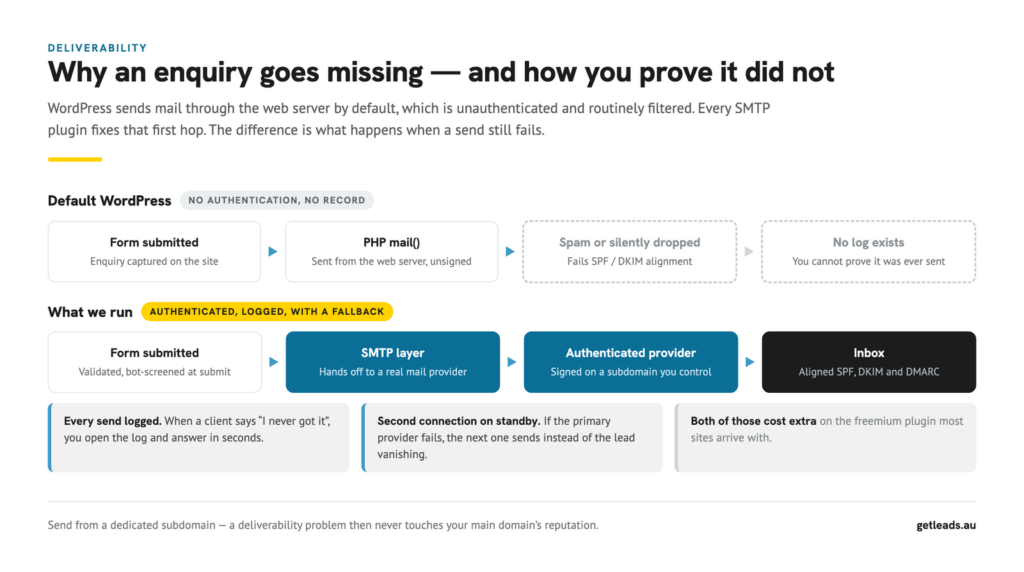
Why not WP Mail SMTP. It is actively maintained and it works — I want to be precise here, because “outdated” is the usual criticism and it is not accurate. The issue is what sits behind the paywall. In the free version you do not get email logging, and several of the mailers most worth using are Pro-only, with Pro starting around US$49 a year per site.
Email logging is not a luxury feature. It is the thing that answers “I never received your quote” in ten seconds instead of an afternoon. FluentSMTP includes logging, multiple connections with automatic fallback, and the full provider list in a plugin with no paid tier at all. Across 160 sites the licence arithmetic is obvious, but we would choose it at one site for the logging alone.
Whichever you use, send from a dedicated subdomain. A deliverability problem then never touches your main domain’s reputation.
6. Gravity Forms with Cloudflare Turnstile
Forms are where the money arrives, so this is the last place to economise. Gravity Forms gives us conditional logic, proper validation and a mature add-on ecosystem — we route submissions to Mailgun for delivery, MailerLite for lists, Twilio for SMS alerts, and webhooks for everything else.
Turnstile handles bot screening without the accessibility cost of image puzzles. We also apply domain validation on enquiry forms, which removes most offshore solicitation before it reaches an inbox.
7. LiteSpeed Cache, Perfmatters and Cloudflare
Three layers, three distinct jobs: LiteSpeed caches full pages at the origin, Perfmatters removes scripts and assets from pages that do not need them, and Cloudflare serves the result from the edge.
Why not WP Rocket. It is excellent and for a single site on standard hosting it may well be the better answer. Our hosting runs LiteSpeed at the server level, and a server-level cache beats an application-level one — adding WP Rocket on top would be exactly the overlap gate 3 exists to catch.
One warning from our own site: with two cache layers, a database change is not a live change. Purge the origin first, prime it, then purge the CDN. Purge them in the wrong order and the CDN refetches the stale page and re-caches it.
8. ShortPixel — images
Images are usually the largest thing on the page and the easiest win available. ShortPixel compresses on upload, serves WebP and AVIF, and handles the resizing most people forget. Nothing exotic; it just runs.
9. MainWP — the layer most plugin lists leave out
This is the one that makes the rest of the list defensible, and it never appears in articles like this because it is invisible to the client.
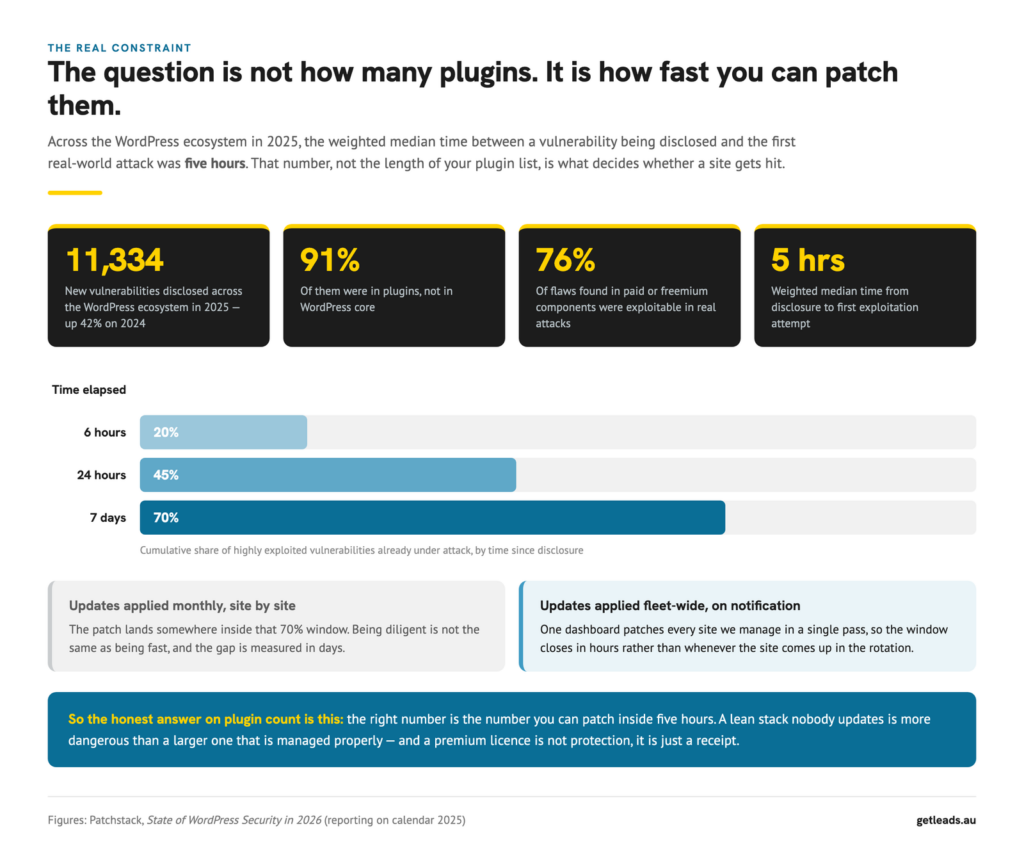
MainWP connects every site we manage to one dashboard. When a vulnerability is disclosed we can see which sites are affected and patch all of them in a single pass, rather than working through a list over the following fortnight. Note the premium-component figure in that diagram: 76% of vulnerabilities found in paid or freemium plugins were exploitable in real attacks. Paying for a plugin buys you support and a roadmap. It does not buy you safety.
10. AI Crawler Monitor and schema — being readable to answer engines
A growing share of buying decisions now starts in an AI answer rather than a list of blue links, and the mechanics are different. Answer engines read structured data and lift sentences. If your schema does not describe the entity properly, you are invisible to them no matter how you rank.
We monitor which AI crawlers visit, what they take, and whether the site is being cited — the measurement behind our AI visibility audit. This is new enough that anyone claiming certainty is guessing, but the measurement costs us almost nothing and the alternative is finding out in a year.
What we deliberately do not run
- A second security plugin. One, plus the edge.
- Plugin-based backups. Backups belong at host level, stored off-server. A backup plugin living inside the thing it is backing up is not a backup.
- All-in-one “optimisation” suites. They overlap three of our layers and hide what they changed.
- Related-posts and social-sharing plugins. Both are template work.
- Anything abandoned. No release in twelve months is a disqualification regardless of quality.
When a plugin breaks
- Establish what changed. Updates, licence renewals, PHP version, DNS. Something changed.
- Check for the recovery email. WordPress emails a recovery link on a fatal error, which gets you into the admin when the front end is down.
- Reproduce it safely. On staging, never on production. Deactivate in halves rather than one at a time — three steps instead of twenty.
- Check compatibility. PHP version and WordPress version, against the plugin’s stated support.
- Check the licence. An expired licence silently disables updates long before it disables function, so the symptom usually arrives months after the cause.
- Send a real error log. Not a screenshot of a white page. Developers fix logs.
So how many plugins is too many?
The number that matters is not how many you have installed. It is how many you can patch inside five hours, how many you could remove today without anybody noticing, and how many you could still explain the purpose of if someone asked.
If you cannot answer the last one for every plugin on your site, that is the real finding — and it is the usual outcome of the audits we run. Websites that perform are not the ones with the shortest plugin list. They are the ones where every component is deliberate and every component is current.
Frequently asked questions
What are the most essential WordPress plugins for a business website?
A builder, one SEO plugin, one security layer, an SMTP plugin so email arrives, a forms plugin, image optimisation and caching. Everything after that should earn its place against a specific job.
Is a free plugin less safe than a paid one?
No. In 2025, 76% of vulnerabilities found in paid or freemium components were exploitable in real attacks. A licence buys support and a roadmap, not security. Maintenance cadence is the signal worth reading.
Do I still need a security plugin if my host has a firewall?
Usually yes, but for different work. A host firewall filters traffic before it reaches WordPress; a security plugin sees things only visible inside WordPress, such as login behaviour and file changes. Run one of each, never two of either.
Is it bad to have a lot of plugins?
Only if they are unmaintained, overlapping, or nobody can say what they do. Forty current, deliberate plugins are safer than twelve neglected ones.
What is the best free SEO plugin for WordPress?
Any of SEOPress, Rank Math or Yoast will handle the mechanics well in their free versions. Pick one, run only that one, and spend the saved effort on what the pages actually say.
Want someone to check yours?
We audit plugin stacks as part of hosting and maintenance: what is installed, what is current, what overlaps, what has quietly stopped receiving updates, and what can be removed without touching how the site looks or works. You get the list and the reasoning whether or not you ever work with us.
Source: Patchstack, State of WordPress Security in 2026 — vulnerability counts, plugin share, premium component exploitability and time-to-exploitation figures, all reporting on calendar 2025.